


Dell WD25TB5 Pro Thunderbolt 5 Dock
- Brand: Dell
- Product Code: 210-BTHZ [#6]
- sku: 210-BTHZ
- Reward Points: 37
- Availability: In Stock ✓ Ready to ship!
- Qty available: 118
R7,468.80 inc. VAT
- Ex VAT: R6,494.61
- Price in reward points: 7469
The specifications below may differ from the model's specifications. Please view the above short specification block to verify which features apply in this model. E&OE.
Overview Summary:
The Dell WD25TB5 Pro Thunderbolt 5 Dock is designed to streamline your workspace and enhance productivity in South Africa. Supporting up to four 4K displays and offering multiple USB-A and USB-C ports, this dock delivers seamless connectivity for laptops and desktop PCs. With robust power delivery up to 300W, it keeps high-performance systems fully powered through a single cable. Shop now to simplify your setup and enjoy smooth multitasking across multiple devices.Built with sustainable materials and equipped with IT management tools like the Dell Device Management Console and Intel AMT, the WD25TB5 combines eco-conscious design with advanced functionality. Its universal compatibility ensures easy integration across different PC brands. Buy now to upgrade your docking experience with reliability and efficiency.
Performance tier: High-end
Uses: Connecting multiple displays, charging laptops, extending USB and Thunderbolt connectivity, network access, workstation setup
Overview:
Dell Pro Thunderbolt 5 Dock WD25TB5
Elevate your workspace with the Dell Pro Thunderbolt 5 Dock WD25TB5, engineered for high-performance PCs and versatile setups. This docking station supports up to four 4K displays at 120Hz, providing smooth, high-resolution visuals for demanding workflows. With up to 300W power delivery through a single USB-C connection, it keeps your devices charged while maintaining a streamlined, clutter-free desktop. Universal compatibility and robust connectivity options make this dock a reliable solution for multi-device environments.
Description:
The Dell WD25TB5 Pro Thunderbolt 5 Dock delivers powerful, seamless connectivity for professionals who require maximum efficiency. It includes multiple USB-A and USB-C ports, two Thunderbolt 5 ports, dual DisplayPorts, an HDMI 2.1 port, and 2.5 Gigabit Ethernet for versatile peripheral connections. Extended Power Range ensures even high-performance PCs receive sufficient power through one cable. The dock is easy to manage using Dell Device Management Console, supports silent firmware updates, and enables Intel Active Management Technology on compatible Intel vPro systems. Built from sustainable materials and packaged using eco-friendly resources, it combines performance, convenience, and environmental responsibility.
Features:
Enhanced Productivity and Performance
Boost your AI workloads and multitasking capabilities across multiple high-resolution displays. Extended Power Range provides reliable power delivery for intensive computing tasks, all through a single cable connection.
Simplified IT Management
Effortlessly manage the dock with Dell Device Management Console and Dell Display and Peripheral Manager. Apply firmware updates without interrupting workflow and access out-of-band management with Intel AMT on select PCs.
Seamless Cross-Platform Use
Enjoy universal compatibility with PCs and laptops across different brands. Features like MAC Address Pass-Through and Power Button Sync ensure smooth docking, while the ambidextrous USB-C cable can be positioned to suit any workspace layout.
Eco-Friendly Construction
Constructed from at least 65% post-consumer recycled plastic and packaged with fully recyclable or renewable materials, this dock reduces environmental impact without compromising durability or performance.
Comprehensive Connectivity Options
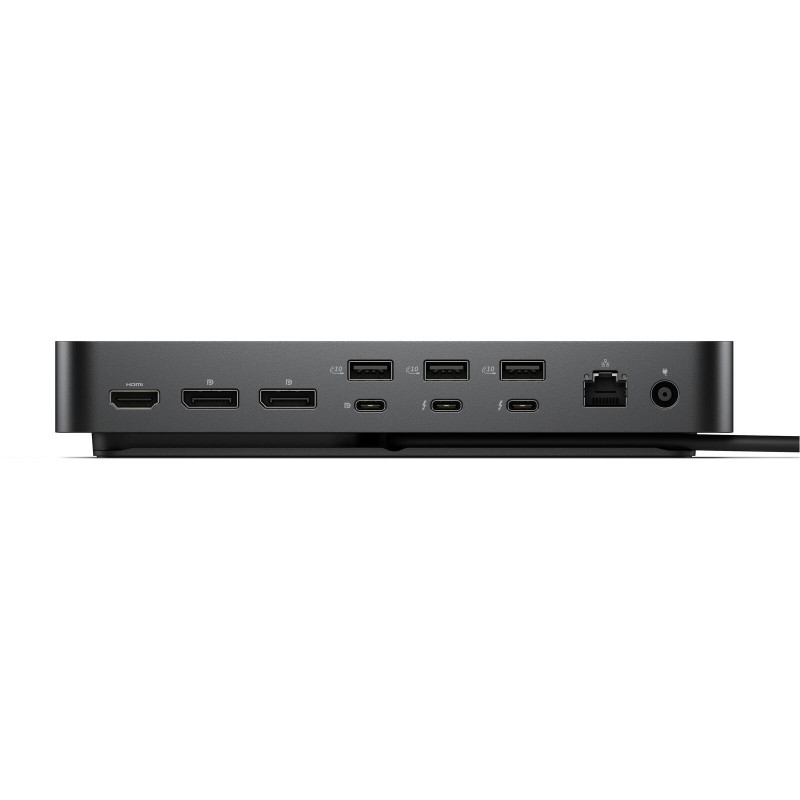
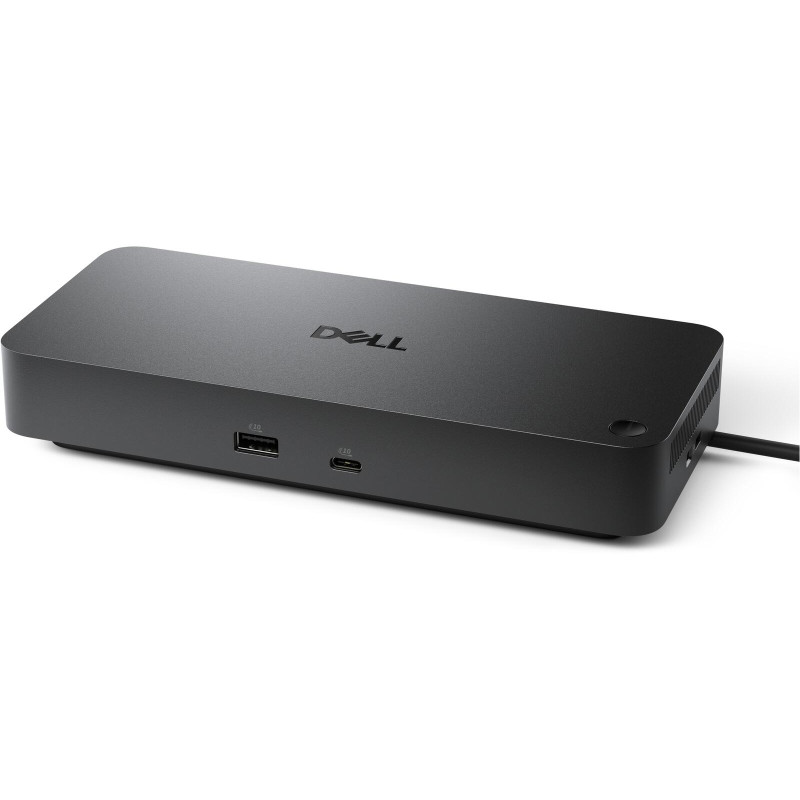
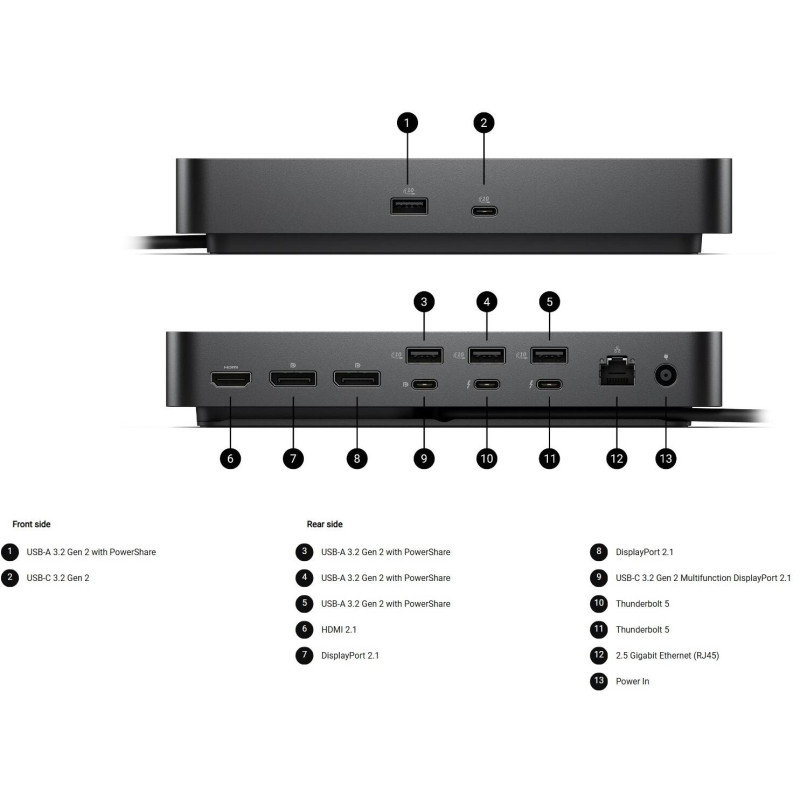
Front: USB-A 3.2 Gen 2 with PowerShare, USB-C 3.2 Gen 2. Rear: three USB-A 3.2 Gen 2 with PowerShare, USB-C 3.2 Gen 2 Multifunction DisplayPort, two Thunderbolt 5 ports, HDMI 2.1, two DisplayPort 2.1, 2.5 Gigabit Ethernet, power input.
Advanced Display Support
Supports up to four displays including 4K at 120Hz, 8K at 60Hz, and other high-resolution formats. Perfect for creative professionals, engineers, and data analysts requiring precise visuals.
Robust Security and Management
Equipped with Kensington and Noble Wedge security slots, Wake-on-LAN, PXE Boot, DMA protection, and Dell Command Update for streamlined device and firmware control.
Technical Details
Connectivity: Wired, Thunderbolt 5 host interface, total of six USB ports, 2.5 Gigabit Ethernet, multiple video outputs. Dimensions: 205 mm x 90 mm x 35.3 mm. Weight: 620 g. Compatible operating systems include Windows 10/11, Ubuntu 24.04, Red Hat Enterprise Linux 9.7, ChromeOS 141, and macOS.
Package Includes
Pro Dock WD25TB5 docking station, power adapter, power cord, quick start guide, and documentation for safety, regulatory, and environmental information.
Specifications:
| Copyright belongs to the respective owners and brand holders. This table has been carefully researched and generated by ComXpert International CC , however, errors and omissions may occur. Only references to South Africa apply. All products are sourced in South Africa from the official suppliers and the warranty is that of the local supplier. E&OE. This table and our site's content may be used on condition that this notice and link remains intact and unaltered. | |
| Specifications | |
| Product Code | 210-BTHZ |
| Technical Information | |
| Connectivity Technology | Wired |
| Device Supported | Notebook |
| Desktop PC | |
| Cable Length | 83 cm |
| Features | Power Delivery Pass-through |
| LED Power Indicator | |
| Indicator Light | |
| Management Features | Intel AMT over Thunderbolt with select Intel vPro PCs |
| MAC Address Pass-through | |
| PXE Boot | |
| Dock Power Button Sync | |
| Wake-on-LAN | |
| WLAN to LAN Switch | |
| Kernel Direct Memory Access (DMA) Protection | |
| Dell Command Update (DCU) | |
| Port Disablement | |
| Host PC based firmware update | |
| Firmware update on disconnect | |
| Number of Displays Supported | 4 |
| Screen Mode Supported | QHD @ 60Hz |
| WQHD @ 60Hz | |
| 4K @ 60Hz | |
| 5K @ 60Hz | |
| 6K @ 60Hz | |
| 8K @ 60Hz | |
| 4K @ 120Hz | |
| Supported Resolutions | 3840 x 2160 |
| 5120 x 2160 | |
| 2560 x 1440 | |
| 3440 x 1440 | |
| 7680 x 4320 | |
| 6144 x 3456 | |
| Maximum Data Transfer Rate | 1.25 GB/s |
| Security Slot Type | Kensington Security Slot |
| Noble Wedge Security Slot | |
| Power Delivery Details | 4 x USB-A 3.2 Gen 2 (4.5W each) |
| 1 x USB-C 3.2 Gen 2 (15W) | |
| 1 x USB-C Multi-function DisplayPort (7.5W) | |
| 2 x Thunderbolt 5 (15W each) | |
| All deliver power with or without PC | |
| Power Delivery | Up to 300W (Dell Systems) |
| Up to 240W (non-Dell Systems) | |
| Video Resolution Details | QHD - 60 Hz (Quad Display) |
| WQHD - 60 Hz (Triple Display) | |
| 4K - 60 Hz (Dual Display) | |
| 5K - 60 Hz (Single Display) | |
| 4K - 60 Hz (Quad Display) | |
| 4K - 60 Hz (Triple Display) | |
| 6K - 60 Hz (Dual Display) | |
| 8K - 60 Hz (Single Display) | |
| 4K - 120 Hz (Quad Display) | |
| 4K - 120 Hz (Triple Display) | |
| Network & Communication | |
| Ethernet Technology | 2.5 Gigabit Ethernet |
| Interfaces/Ports | |
| Host Interface | Thunderbolt 5 |
| Total Number of USB Ports | 6 |
| USB Type-A | Yes |
| Number of USB 3.2 Gen 2 Type-A Ports | 4 |
| Number of USB 3.2 Gen 2 Type-C Ports | 1 |
| Number of USB Type-A Ports | 4 |
| USB Type-C | Yes |
| USB Type-C Detail | 1 x USB-C 3.2 Gen 2 (10 Gbps), (15W), 1 x USB-C Multi-function DisplayPort (7.5W) |
| Number of USB Type-C Ports | 2 |
| Network (RJ-45) | Yes |
| DisplayPort | Yes |
| Number of DisplayPorts | 2 |
| DisplayPort Version | 2.1 |
| HDMI | Yes |
| Number of HDMI Ports | 1 |
| HDMI Version | 2.1 |
| Thunderbolt | Yes |
| Thunderbolt Ports Quantity | 2 |
| Software | |
| Host Software | Host Software (Windows): |
| Dell Firmware Utility | |
| Dell Display and Peripheral Manager | |
| Dell Command Update | |
| Cloud Management (via host PC software) | |
| Dell Device Management Console enables: | |
| Automatic firmware updates | |
| Maintain specific firmware version or downgrade | |
| Peripheral inventory and status | |
| Operating System Supported | Windows 10 |
| Windows 11 | |
| Ubuntu 24.04 | |
| Red Hat Enterprise Linux 9.7 | |
| ChromeOS 141 | |
| macOS | |
| Power Description | |
| Maximum Power Supply Wattage | 330 W |
| Power Source Type | Power Adapter |
| Physical Characteristics | |
| Height | 205 mm |
| Width | 90 mm |
| Depth | 35.3 mm |
| Weight (Approximate) | 620 g |
| Miscellaneous | |
| Package Contents | Pro Dock WD25TB5 Docking Station |
| Power Adapter | |
| Power Cord | |
| Documentation (Quick Start Guide, Safety, Environmental, and Regulatory Information) | |
| Kensington Security Slot | Yes |